Chapter 6: Advanced Editing
 |
6-8: Text
6-8-3: Modifying Text |
|
Like nodes and arcs, text can be moved simply by clicking and dragging.
Text can be rotated by selecting it and using the Rotate commands in the Edit menu.
Text can be erased by selecting it and using the Selected command of the Edit / Erase menu
(the Delete key).
Changing a Single Piece of Text
To change text, double-click on it and type a new value.
To change other aspects of selected text, and use the
Object Properties... command (in menu Edit / Properties).
Besides the text at the top of the dialog, these fields can be modified:
- "Text Size" can be absolute (given in "points") or relative (given in units).
- "X/Y offset" is relative to the center of the attached object.
- "Rotation" is in 90-degree increments only.
| 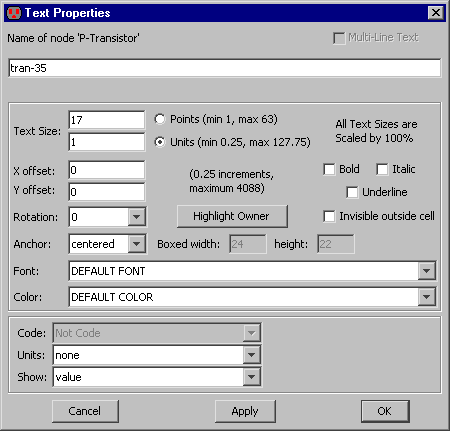 |
- "Anchor" is the point in the text that remains unchanged
(see Section 6-8-2).
- "Font" can be the default font or any font installed on your system.
- "Color" can be any color.
- "Bold", "Italic", and "Underline" can be set in any combination.
These additional factors can be controlled:
- "Code" allows the text to be code in an interpretive language,
in which case, the evaluation of that code is displayed.
The code choices are:
- "Not Code" the text is taken as-is.
- "Java" the text is handed to a Java interpreter for evaluation.
For example, the expression "Math.abs(-4*5)" will be converted to "20".
- "Spice" the text is handled as a Spice expression.
Spice allows simple expressions and Electric is able to evaluate them.
These expressions are not as powerful as Java.
One advantage of Spice code is that the Spice deck writer can send them unevaluated to the Spice deck.
- "Units" can be any electrical type (capacitance, resistance, etc.)
See Section 7-2-2 for more on units.
- "Show" allows you to show the text value, the name of the piece of text, or both.
- "Multi-Line Text" allows the text to have more than one line.
After checking this box,
it may be useful to stretch the dialog in order to have a larger field for editing the text.
- "Highlight Owner" highlights the node or arc on which the text is attached.
- "Invisible outside cell" requests that the text not be drawn when an instance of the cell is examined.
Changing Multiple Pieces of Text
The above dialog changes information on a single piece of text.
There are two ways to change information on multiple pieces of text:
(1) select all of the text and use Object Properties... or
(2) use the Change Text Size... command (in menu Edit / Text).
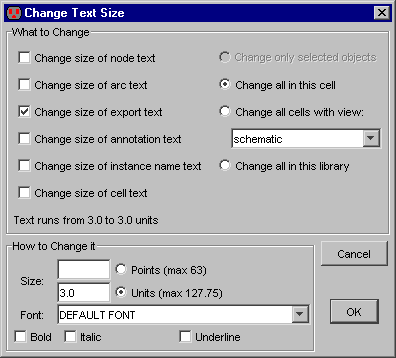 |
The Change Text Size... command
allows you to change the size, font, and style of any text object.
Instead of selecting the text, you have a choice of 6 classes of text that can be changed,
and you can choose whether to make the changes only on selected objects, in the current cell,
in all cells of a particular view, or everywhere.
|


